Connection to least squares: Each term is a residual!
The Correspondence Problem
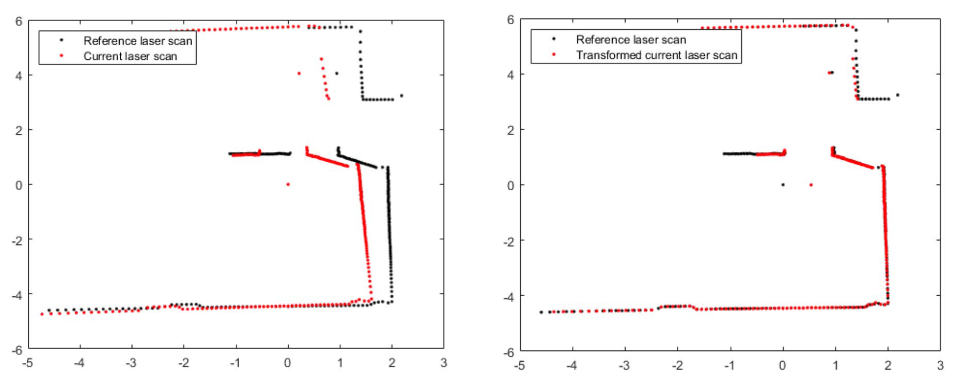
Key challenge: We usually don’t know which matches which !
Same physical point may not be observed in both scans
Points have different indices in each scan
Some points have no match at all
Solution: Iteratively estimate correspondences and transformation
Part 2: The ICP Algorithm
Iterative Closest Point (ICP)
Core idea: Alternate between:
Finding correspondences: For each point, find its nearest neighbor
Solving for transformation: Given correspondences, find best
Repeat until convergence
ICP Algorithm: Pseudocode
Input: Source points P, Target points Q, initial guess T₀
Output: Transformation T aligning P to Q

T ← T₀
repeat:
    P' ← apply T to P

    # Step 1: Find correspondences
    for each p' in P':
        c(p') ← nearest neighbor of p' in Q

    # Step 2: Compute optimal transformation
    T_new ← solve_alignment(P', correspondences)
    T ← T_new ∘ T

until convergence
return T
ICP Step 1: Nearest Neighbor
For each transformed source point , find:
Implementation:
Brute force: for source, target points
KD-tree: average case
ICP Step 2: Solve for Transformation
Given correspondences, minimize:
Closed-form solution (Arun et al., 1987):
Compute centroids: ,
Center the points: ,
Compute
SVD: , then
Translation:
ICP Implementation
import numpy as npdef nearest_neighbors(source, target):"""Find nearest neighbor in target for each source point.""" indices = []for p in source.T: dists = np.linalg.norm(target.T - p, axis=1) indices.append(np.argmin(dists))return np.array(indices)def compute_transformation(source, target_matched):"""Compute optimal R, t using SVD."""# Centroids centroid_s = source.mean(axis=1, keepdims=True) centroid_t = target_matched.mean(axis=1, keepdims=True)# Center points s_centered = source - centroid_s t_centered = target_matched - centroid_t# SVD H = s_centered @ t_centered.T U, _, Vt = np.linalg.svd(H) R = Vt.T @ U.T# Ensure proper rotation (det = 1)if np.linalg.det(R) <0: Vt[-1, :] *=-1 R = Vt.T @ U.T t = centroid_t - R @ centroid_sreturn R, t.flatten()
ICP: Full Algorithm
def icp(source, target, max_iters=50, tol=1e-6):""" Iterative Closest Point algorithm. source, target: 2×N arrays of 2D points Returns: R (2×2), t (2,), history of errors """ R_total = np.eye(2) t_total = np.zeros(2) errors = [] current = source.copy()for _ inrange(max_iters):# Step 1: Find correspondences indices = nearest_neighbors(current, target) matched = target[:, indices]# Compute error error = np.mean(np.linalg.norm(current - matched, axis=0)) errors.append(error)# Step 2: Compute transformation R, t = compute_transformation(current, matched)# Apply transformation current = R @ current + t.reshape(2, 1)# Accumulate R_total = R @ R_total t_total = R @ t_total + t# Check convergenceiflen(errors) >1andabs(errors[-2] - errors[-1]) < tol:breakreturn R_total, t_total, errors